

Nothing slows down a deployment quite like a confusing CORS error.
A web application is working in development. APIs are responding correctly. Authentication is configured. Everything appears ready to go. Then the browser blocks a request with an unfamiliar message about missing headers, failed preflight checks, or unauthorized origins.
The frustrating part? The application itself is usually not broken. Most CORS (Cross-Origin Resource Sharing) issues are configuration problems involving API responses, authentication settings, infrastructure layers, or cloud services.
As applications become more distributed, these issues become more common. A single request may travel through frontend applications, APIs, authentication providers, API gateways, reverse proxies, and CDNs before reaching its destination. When those systems are not aligned, the browser steps in and blocks the request.
By default, browsers enforce the same-origin policy: JavaScript running on one origin cannot read responses from a different origin. That policy is what protects users — without it, any website you visit could quietly read data from your bank or email using your logged-in session.
CORS is the mechanism that relaxes this policy. It lets a server declare which other origins may read its responses, which HTTP methods and request headers are permitted, and whether credentials such as cookies may be included.
An origin is the combination of three components: scheme (protocol), host, and port. For example:
Although both belong to the same organization, browsers treat them as different origins because the hostnames differ — so every call from the app to the API is a cross-origin request.
Worth knowing: CORS does not stop requests from reaching your server.
The server typically processes the request and returns a response; the browser then refuses to let the page read it. This is also why CORS is not a defense against CSRF — the forged request still executes. CSRF protection is a separate concern.
When a page makes a cross-origin request, the browser looks at the method, the headers, and whether credentials are involved, then takes one of two paths.
A narrow class of requests is sent directly, with no preflight. A request is "simple" only if all of the following are true:
Note what is missing from that list: a POST sending application/json is not a simple request. Neither is any request carrying an Authorization header. In a modern SPA, that covers almost everything — which is why preflights are everywhere.
For simple requests, the server responds normally, and the browser checks the response for an Access-Control-Allow-Origin header before handing the data to your code. If permission is missing, the response is blocked.
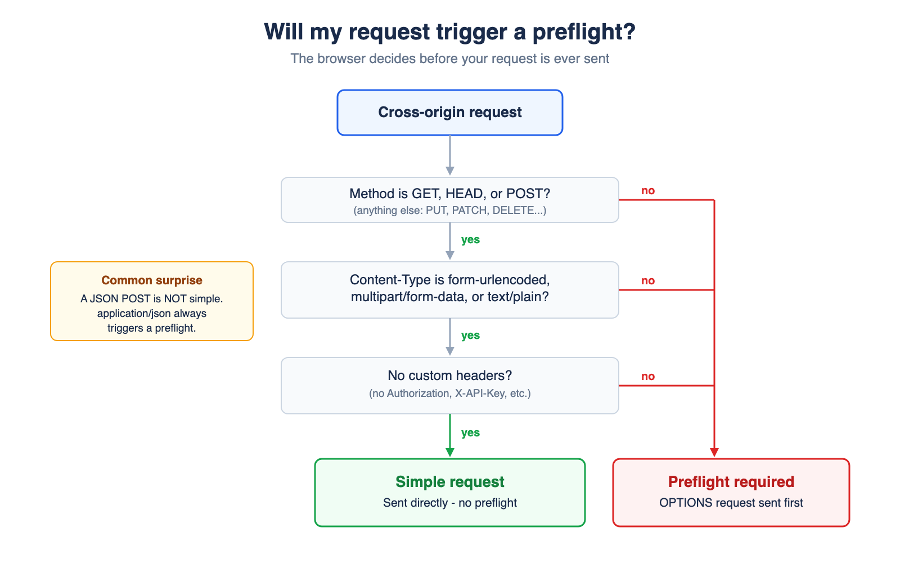
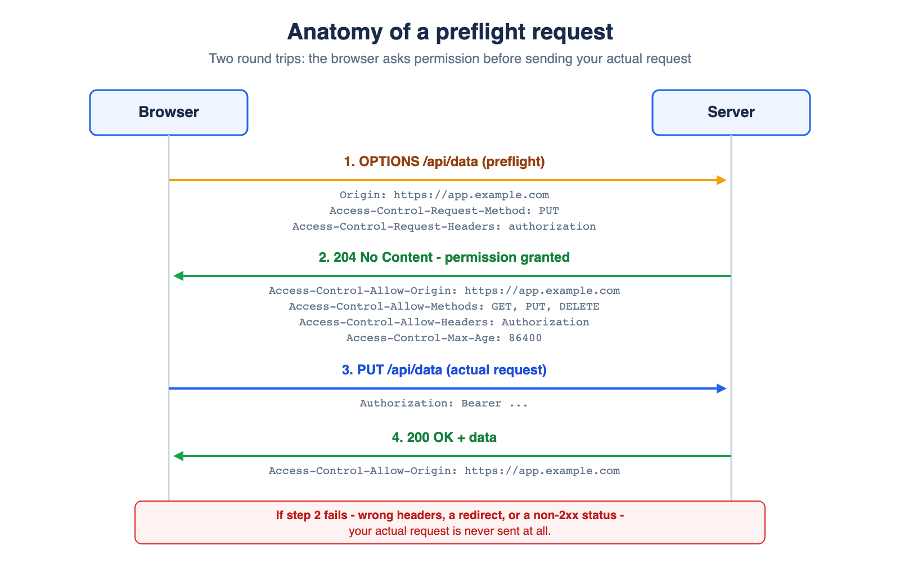
Everything else requires an extra round trip. Before sending your actual request, the browser sends an OPTIONS request asking the server three questions: Is this origin allowed? Is this method permitted? Are these headers acceptable?
The preflight response must answer with the appropriate Access-Control-Allow-* headers, return a 2xx status, and must not redirect. Only then does the browser send the real request. If the preflight fails, your request is never sent at all.
CORS errors are uniquely frustrating because the browser reports the problem, but the root cause lives somewhere else. Developers instinctively start with their JavaScript, their framework, or their API logic. The issue is far more often in response headers, API gateways, reverse proxies, authentication services, or CDN configuration.
The key thing to understand: CORS is enforced by the browser, not the server. An API can process a request successfully, a database can return data, and the browser can still block the response because the required permissions were missing or mangled along the way.
The most common CORS error: the server never says who is allowed to read the response. The request may succeed server-side, but the browser blocks the page from reading the result.
The fix is server configuration, not frontend code:
Access-Control-Allow-Origin: https://app.example.com
For genuinely public, non-credentialed APIs, a wildcard may be appropriate:
Access-Control-Allow-Origin: *
One caveat before you reach for the wildcard: it cannot be combined with credentialed requests (see error #4).
Preflight failures cover a family of related problems. The OPTIONS request fails because:
A healthy preflight response returns 2xx with headers matching what the request needs:
Access-Control-Allow-Origin: https://app.example.com
Access-Control-Allow-Methods: GET, POST, PUT, PATCH, DELETE
Access-Control-Allow-Headers: Authorization, Content-Type, X-API-Key
Two practical rules: exempt OPTIONS from authentication, and set Access-Control-Max-Age (e.g. 86400) so browsers cache the preflight result instead of repeating it on every request.
This one is almost exclusively a production error. It happens when two layers each add CORS headers — typically the application and a proxy, gateway, or CDN in front of it. Individually each configuration is valid; together they produce a duplicated header, which browsers reject outright.
The fix: pick exactly one layer to own CORS and remove the configuration everywhere else.
When requests carry credentials — cookies, sessions behind SSO, or fetch with credentials: "include" — the rules tighten. A wildcard origin is not accepted. The server must name the origin explicitly and opt in to credentials:
Access-Control-Allow-Origin: https://app.example.com
Access-Control-Allow-Credentials: true
Authentication and CORS are separate systems; both must be configured correctly, and they must agree with each other.
If your server echoes the request's origin dynamically (common when multiple frontends are allowed), a CDN or cache between you and the browser can store a response generated for one origin and serve it to another — delivering the wrong Access-Control-Allow-Origin value. The symptom is maddening: CORS fails intermittently, or only for some users.
The fix is telling caches that the response varies by origin:
Vary: Origin
A quieter variant: the request works, the data arrives, but response.headers.get("X-Request-Id") returns null. By default, cross-origin JavaScript can only read a handful of safelisted response headers. Anything custom must be exposed explicitly:
Access-Control-Expose-Headers: X-Request-Id, X-RateLimit-Remaining
Production traffic rarely goes straight from the browser to your application. It passes through CDNs, load balancers, reverse proxies like NGINX, and API gateways such as Amazon API Gateway, Azure API Management, Kong, or MuleSoft. Every one of those layers can add, strip, rewrite, or cache CORS headers.
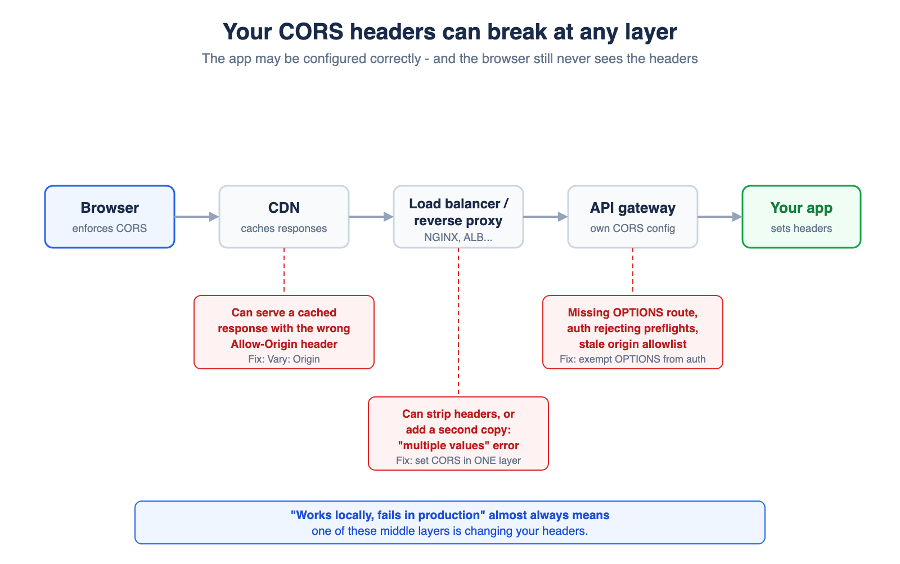
The telltale signs that a middle layer is responsible:
When you see these, stop debugging the application and start walking the request path: browser, then CDN, then proxy, then gateway, then app. Every layer must preserve the headers.
The console message names the failing condition: a missing Allow-Origin header, a failed preflight, a disallowed header, duplicate values, or a credentials conflict. Each maps to a different fix — start with what the browser is actually telling you.
Find the failing request in your browser's developer tools. If there is an OPTIONS request before it, check its status code and response headers. A 4xx or 5xx on the OPTIONS request means the preflight itself failed and the real request never ran.
Take the browser out of the picture and replay the preflight with curl:
curl -i -X OPTIONS https://api.example.com/data \
-H "Origin: https://app.example.com" \
-H "Access-Control-Request-Method: PUT" \
-H "Access-Control-Request-Headers: authorization"
The response should be 2xx and include Access-Control-Allow-Origin, -Methods, and -Headers values that cover your request. If it does, the server is fine and the problem is in front of it. If it does not, the problem is the server or gateway configuration.
If the application configuration looks correct, investigate the surrounding systems one at a time: load balancers, reverse proxies, API gateways, CDNs. Compare the headers your app emits with the headers the browser receives — the layer where they change is your culprit.
CORS errors get filed as frontend bugs, but they are really a coordination problem between systems: the browser, the application, and every piece of infrastructure in between. The path to a fast fix is always the same — understand where the request travels, and find the layer where the permissions break down.
A checklist worth keeping:

Not sure on your next step? We'd love to hear about your business challenges. No pitch. No strings attached.


