

Insights are only as valuable as the speed at which you can act on them. In the past, Amazon Quick Sight was a powerhouse for visualization, but moving from a chart to a business move often required many steps of manual analysis and communication.
Enter Amazon Quick.
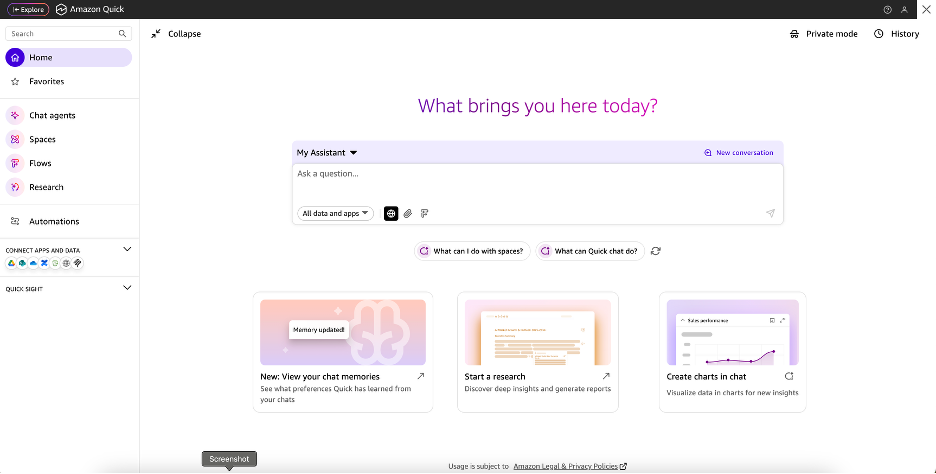
This isn't just a rebrand; it’s an evolution from a BI tool into an agentic workspace. Think of it as upgrading from a telescope, where you can see the problem, to a mission control center, where you can actually launch the solution. Most notably, Quick introduces four pillars that dismantle the silos between data and execution. Here is a quick introduction to each of those pillars:
Spaces are like an all-in-one structure for organizing different types of data and resources. Historically, BI assets lived in disparate dashboards, while the context - the PDFs, meeting notes, and documentation - lived in a fragmented mess of external drives and folders. A dashboard without context is like forgetting the unit of measurement on a math test. You can’t just say that the ball was flying at 45, 45 what? MPH? KMPH? Degree angle?
Spaces allow you to group specific datasets, dashboards, and files with internal foundations into one environment. One of the largest uses of this is to enable your AI agents a thorough knowledge base to call from. By grouping your "Q4 Retail Data" with your "Retail Strategy PDF," you’re giving the AI agents the internal validity they need to answer questions based on your specific business logic, rather than just general world knowledge. This consolidation ensures that when a stakeholder enters a Space, they have the full narrative - from raw data to the strategic why behind it - all in one secure, governed location.
Chat Agents in Quick aren't just search bars; they are customizable assistants. You can curate a chat agent’s knowledge base to include what is most relevant for its users. Your chat agent can go from providing recommendations based on current market trends to creating a natural language summary of an executive Quick Sight dashboard that notes important trends/indicators.
You can build a Sales Specialist Agent that only looks at CRM data and sales playbooks. It won't get distracted by the Marketing team's metrics or the Engineering team’s project logs. These agents allow for RAG (Retrieval-Augmented Generation) against your specific Quick Index, meaning they cite their sources within your documentation. By defining specific instructions and guardrails for these agents, you ensure they don't hallucinate.
Sometimes a bar chart isn't enough; you need a white paper. Quick Research acts as the academic of the suite. Manual research can turn into a productivity sinkhole, often leaving analysts spending a majority of their time gathering data/information, which leaves less time to decide what to do with it.
Quick Research automatically performs the legwork of scouring the internet and internal data to synthesize long-form reports. It can turn what used to be a week-long market analysis project into a multi-hour automated task, providing executive summaries and data-backed projections.
If Research is the thinker, Flows are the doer. This is where Quick moves into process management. What sets Flows apart from traditional automation tools is the deep integration of generative AI; you can actually embed your Chat Agents directly into a workflow to interpret data before an action is taken.
Using natural language, you can build workflows such as: "Create a weekly update of the executive summary dashboard. Be sure to include our key KPIs, as well as any trends from this past week. Send this update each Monday morning at 9 am to the team via Outlook." This is entirely codeless and allows you to connect Quick to external apps like Salesforce, Asana, or Slack, ensuring your data triggers a business response in real-time.
The transition from Quick Sight to Quick is AWS's way of acknowledging that data doesn't exist in a vacuum. By integrating Spaces, Agents, Research, and Flows, they are trying to help you prevent the questionable outcome of a great insight that never gets implemented because the team was too busy manually copying data into a PowerPoint.
Fortunately for us, this expansion doesn't demand perfection from day one. You can start small, build a Space, train an Agent, and let the agentic era do the heavy lifting while you focus on the strategy. Because at the end of the day, a dashboard that can't trigger an action or easily provide insights is just a memento mori for your lost productivity.
To see a deeper dive into each of these core Quick features and real use-cases in action, keep an eye out for future posts in this series!
If you’re thinking about leveraging the agentic power of Amazon Quick, we can help. Let’s work together to unveil a new level of efficiency and innovation in your reporting.

Not sure on your next step? We'd love to hear about your business challenges. No pitch. No strings attached.


